Firebolt
Querying Overview
Firebolt uses SQL as the basis for its querying language. It includes extensions for semi-structured data, arrays, geospatial data, and JSON. The primary reference for Firebolt SQL is at https://docs.firebolt.io/sql_reference/commands/queries/select.html
For FireBolt core the elements listed in the generic “Collections” drop down for the Data Source Designer and other query tools do not include any tables or views with a table_schema of 'information_schema'. This removes tables and views which are not queryable, but normally listed. See https://docs.firebolt.io/firebolt-core/firebolt-core-differences for more details. A general purpose query would be
SELECT* FROM information_schema.tables
Querying Considerations
Remember that all Firebolt column names are lower cased in the answer set. This matters when referencing row values by field (column) name.
Handling JSON Data
Qarbine natively queries Firebolt which can return answer sets with complex JSON objects. The JSON data is stored in a TEXT column. The JSON functions provide a way to extract specific values from JSON documents, particularly from those stored in a TEXT column. These functions extract part of the document, but preserve the original data in the result:
- JSON_EXTRACT
- JSON_EXTRACT_ARRAY
- JSON_POINTER_EXTRACT_VALUES
These functions convert a JSON value to a SQL value:
- JSON_VALUE
- JSON_VALUE_ARRAY
- JSON_POINTER_EXTRACT_KEYS
For more details see https://docs.firebolt.io/reference-sql/functions-reference/json.
The following discussion is based on the table definition and populating discussed at
https://docs.firebolt.io/guides/loading-data/working-with-semi-structured-data/load-json-data
The statements to create the table and populate it are
-- Create a staging table for raw JSON data with one JSON object per row
DROP TABLE IF EXISTS doc_visits_source;
CREATE TABLE doc_visits_source (
  raw_json TEXT
);

-- Insert raw JSON data as individual rows
INSERT INTO doc_visits_source (raw_json)
VALUES
('{"id": 1, "StartTime": "2020-01-06 17:00:00", "Duration": 450, "tags": ["summer-sale", "sports"], "user_agent": {"agent": "Mozilla/5.0", "platform": "Windows NT 6.1", "resolution": "1024x4069"}}'),
('{"id": 2, "StartTime": "2020-01-05 12:00:00", "Duration": 959, "tags": ["gadgets", "audio"], "user_agent": {"agent": "Safari", "platform": "iOS 14"}}');
Running
SELECT * from doc_visits_source
results in the following answer set

The 2 rows are just single columns with JSON strings.
Firebolt provides several functions to interact with JSON includes ones to extract specific values.Here is SQL to extract the user_agent sub-text.
SELECT *
JSON_POINTER_EXTRACT(raw_json, '/user_agent')::TEXT as user_agent
from doc_visits_source
Sample results are shown below.

Note that these values are just JSON strings and not JSON objects.
Qarbine provides “pragmas” to manipulate answer set contents. These are described in detail within the primary Data Source Designer document. Qarbine can easily convert the JSON strings into JSON objects for use by template processing and other processes. The first one to consider is shown below.
#pragma convertToObject raw_json
select *
 from doc_visits_source
 limit 25
This results in

The first row is shown below.

The formula in the template to access the Duration would be
#raw_Json.Duration
The data of interest is one level deeper than is likely wanted so another pragma stage can be added as shown below.
#pragma convertToObject raw_json
#pragma pullFieldsUp raw_json
select *
 from doc_visits_source
 limit 25
This results in

The first row is shown below.
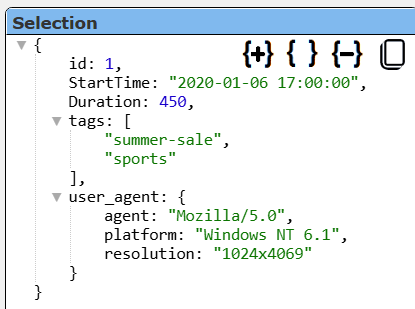
The formula in the template to access the Duration is now simpler
#Duration
Array Handling
Given a table definition of
CREATE FACT TABLE ecommerce (
  product_id INTEGER NOT NULL,
  product_name TEXT,
  tags ARRAY(TEXT)  -- ARRAY of strings, e.g., for product tags
)
PRIMARY INDEX product_id;
and the table populating statement of
INSERT INTO ecommerce (product_id, product_name, tags)
VALUES
  (1, 'Laptop', ['electronics', 'portable', 'fast'] ),
  (2, 'Smartphone', ['electronics', 'mobile', 'camera'] ),
  (3, 'Headphones', ['audio', 'portable'] );
The query
SELECT * FROM ecommerce
results in the answer set

The first row looks like the following

Notice the tags are in their natural array format.
Vector Searching
Firebolt provides support for vector search enabling efficient retrieval of relevant data using vector embeddings. Firebolt does not generate embeddings itself but is designed to work with embeddings from any external model. Firebolt includes vector functions for similarity and distance.
Similarity functions:
- VECTOR_COSINE_SIMILARITY(): Measures the cosine similarity between two vectors.
- VECTOR_INNER_PRODUCT(): Computes the inner product between vectors.
Distance functions:
- VECTOR_COSINE_DISTANCE()
- VECTOR_EUCLIDEAN_DISTANCE()
- VECTOR_MANHATTAN_DISTANCE()
- VECTOR_SQUARED_EUCLIDEAN_DISTANCE()
These functions allow you to order results by similarity or distance, depending on your use case.
Firebolt integrates vector search with structured querying, so you can run hybrid queries that combine vector similarity with traditional filtering (e.g., filtering by chunking strategy, user type, or embedding model). A sample query is shown below.
SELECT chunk_content,
       vector_cosine_similarity(question_vector, EMBEDDING) AS similarity,
       document_name
FROM table_name
WHERE chunking_strategy = 'Semantic chunking'
  AND internal_only = FALSE
  AND embedding_model = 'nomic_embed_text'
ORDER BY similarity DESC
LIMIT 10;
This query retrieves the top 10 most similar chunks to a user's question, using cosine similarity relative to the supplied EMBEDDING value. It can be supplied in a Qarbine query specification using a simple variable
vector_cosine_similarity(question_vector, @myEmbedding)
or dynamically determined using a macro function call to a Qarbine AI assistance via
 vector_cosine_similarity(question_vector,
 [! embedding(@userInput, 'myAiAssistance’) !] )
For more details see the Firebolt documentation at
https://www.firebolt.io/faq/how-does-firebolts-vector-search-compare-to-dedicated-vector-databases
Miscellaneous Queries
The following queries are general DBA oriented ones.
SHOW DATABASES
SHOW TABLES
SHOW COLUMNS user_profile
Troubleshooting
You can obtain the low level query being sent from Qarbine to Firebolt by pressing the ALT key and clicking the run icon.
Firebolt’s Develop Space can be used to run SQL queries interactively. See the following page for details https://docs.firebolt.io/guides/run-queries/using-the-develop-workspace